Too Many Tools for Artists? Build One AI Artist OS

If you’re an independent artist juggling multiple subscriptions, numerous logins, and no integration between them, the answer is straightforward: consolidate onto a single AI artist operating system that handles release workflows, marketing, analytics, fan CRM, and distribution in one place. You don’t need to wait until your next release to start.
Do this in the next 24–72 hours:
- List every tool you’re currently paying for and what it does
- Export your metadata, fan contacts, and royalty reports from each platform
- Schedule a one-week trial of a unified platform (Upncomer is the one worth testing first)
- Identify one upcoming release to use as a pilot project
The rest of this guide explains why fragmentation is costing you real money, what a proper artist operating system must include, and exactly how to migrate without breaking anything live.
Key Takeaways
Independent artists who consolidate onto a single AI artist operating system recover 15–30 minutes per session lost to tool fragmentation and gain a cleaner, faster release workflow from planning through royalty reconciliation.
| Point | Details |
|---|---|
| Fragmentation has a measurable cost | Artists lose 15–30 minutes per session hunting files across disconnected tools. |
| A real artist OS covers nine domains | Distribution, analytics, fan CRM, pitching, mastering, content, campaigns, royalties, and workflow management. |
| Migration takes 2–4 weeks | Budget 8–15 hours of setup time; run a pilot release before migrating your full catalog. |
| Data ownership is non-negotiable | Confirm full export capability for metadata, fan data, and royalty history before committing to any platform. |
| Upncomer covers the full checklist | All nine domains are covered across modules including Amplitude AI, Growth Engine, UrStudio, and Distribution. |
Table of Contents
- Why too many tools for artists is a real business problem
- What must a single artist OS actually do?
- How AI practically reduces your operational load
- Step-by-step: how to consolidate from many apps into one platform
- What questions should you ask vendors before committing?
- Why Upncomer maps to this checklist
- A 90-day release timeline on one unified platform
- What does a release actually require operationally?
- How do AI-driven artist platforms compare in the US market?
- Best practices for staying optimized after you migrate
- What’s the real cost and timeline of consolidating?
- What patterns actually work when artists consolidate
- One platform that covers everything on this checklist
- Sources
- FAQ
Why too many tools for artists is a real business problem
Your metadata lives in a spreadsheet. Your masters are in Dropbox. Your contracts are in Gmail. Your royalty statements are in three different distributor dashboards. Sound familiar?
Operational release work is fragmented across many systems by default, and that fragmentation creates real continuity and scaling problems. Every time you start a session, you spend the first chunk of it just locating things. Practitioners call this the “fragmentation tax,” and one estimate puts it at a notable amount of time lost per session for artists running disconnected tools.
Over a month of weekly sessions, that amounts to several hours lost. Over a year, it’s a significant portion of your creative time.
The hidden cost isn’t just time. Fragmented systems cause missed deadlines, inconsistent metadata across platforms, delayed pitching windows, and royalty discrepancies that take months to untangle. Each of those is a direct hit to your revenue and your reputation with labels, playlist curators, and collaborators.
The specific harms tool sprawl creates:
- Missed pitch windows because promo assets and metadata aren’t ready in the same place at the same time
- Metadata errors that get flagged by DSPs and delay your release date
- Damaged collaborator trust when version confusion leads to the wrong master going live
- Lost royalty revenue from reconciliation gaps between your distributor and your accounting tool
What must a single artist OS actually do?
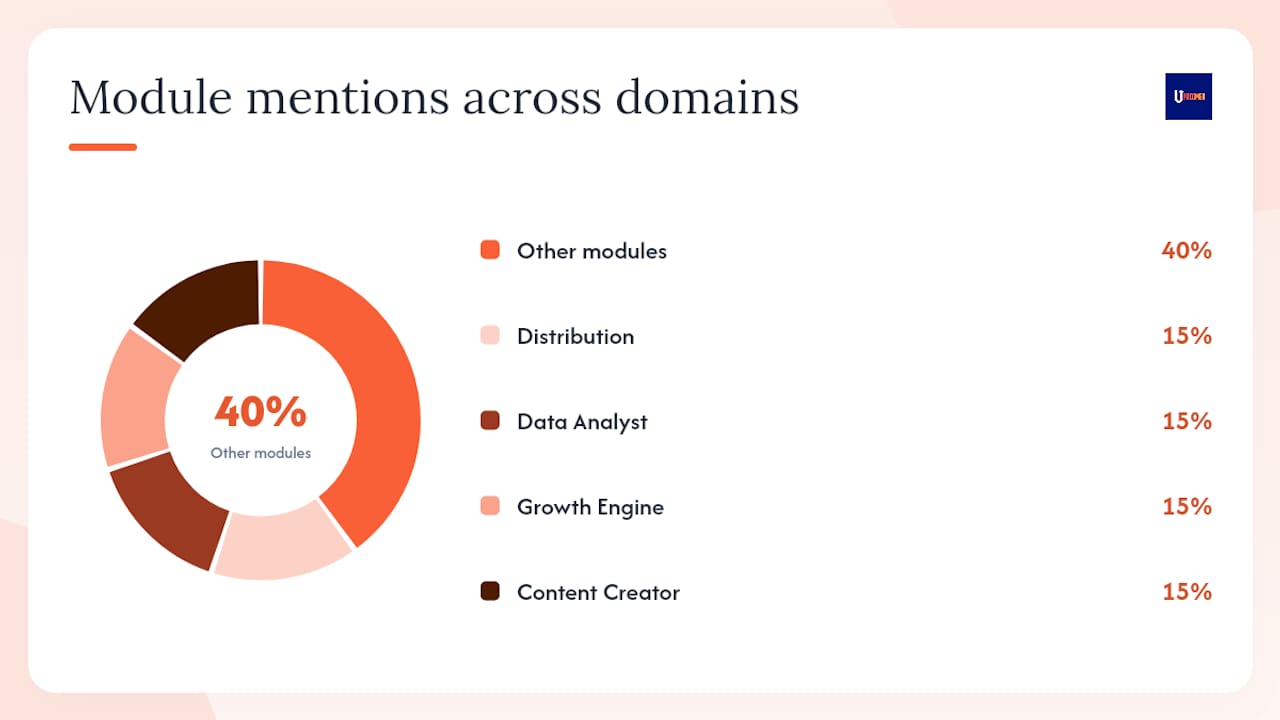
A real artist operating system covers every domain between “track is finished” and “royalties are reconciled.” Here’s the checklist, mapped to Upncomer’s modules:
| Domain | Why it matters for a small team | Upncomer module |
|---|---|---|
| Release and workflow management | Keeps deadlines, assets, and approvals in one place | Artist Manager |
| Music distribution | Gets your music to DSPs with correct metadata | Distribution |
| Playlist pitching and PR | Automates outreach to curators and press contacts | Publicist |
| Streaming analytics | Shows where your listeners are and what’s working | Data Analyst |
| Fan CRM and engagement | Tracks superfans and automates follow-up | Growth Engine |
| Ad and content campaign management | Runs and optimizes paid campaigns without an agency | Growth Engine, Content Creator |
| Royalty reporting and metadata control | Centralizes statements and flags discrepancies | Data Analyst, Distribution |
| AI content creation and mastering | Generates social content and masters audio | Content Creator, UrStudio |
| AI-powered career guidance | Surfaces data-driven suggestions and campaign blueprints | Amplitude AI |
| Education and workflow training | Builds your team’s operational knowledge | ProfessorU |
AI for musicians covers the practical workflow side of several of these domains in more depth if you want to go deeper on any one module.
How AI practically reduces your operational load
AI is best deployed on repeatable operational tasks, not creative decisions. That distinction matters.
AI can analyze your tracks, recommend pitching strategies, identify similar-artist markets, and suggest campaign templates based on past performance. Amplitude AI inside Upncomer does exactly this: it reads your streaming data, flags underperforming campaigns, and generates campaign blueprints you can approve or adjust.
Practical AI use cases for independent artists:
- Automated metadata validation catches ISRC conflicts, missing credits, and DSP-specific formatting errors before upload
- Lookalike fan discovery identifies audiences similar to your current listeners for ad targeting
- Scheduled social content generated from your release assets, queued and posted without manual work
- Royalty reconciliation alerts flag when reported streams don’t match expected revenue
AI music tools are fragmenting into specialized layers. This means using five separate AI tools creates its own version of the fragmentation problem. A single platform with integrated AI avoids that trap.
Pro Tip: Trust AI for pattern recognition and first drafts. Verify anything that touches contracts, metadata submissions, or financial reporting with a human review before it goes live. AI catches errors well; it doesn’t always catch context.
Step-by-step: how to consolidate from many apps into one platform
Consolidating files, versions, metadata, and comments into one canonical hub prevents the wasted sessions that come from version confusion. Here’s the sequence:
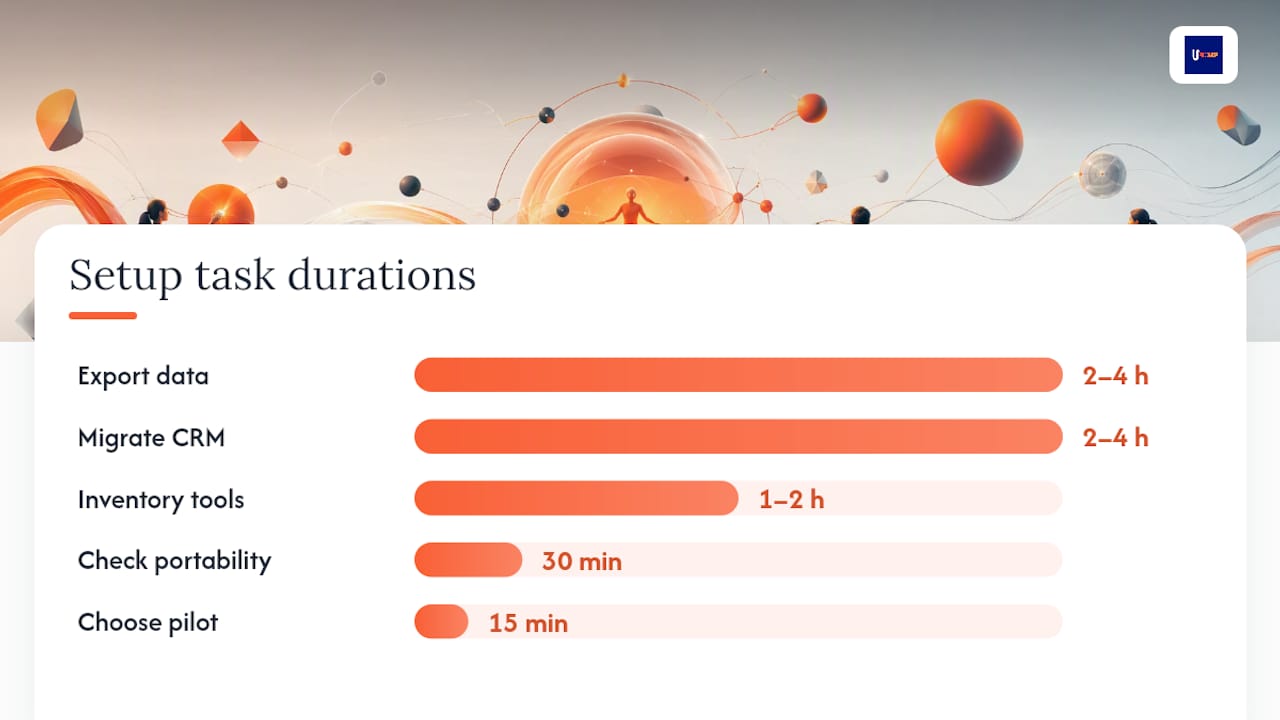
- Inventory all current tools (1–2 hours): List every subscription, what it does, what data it holds, and its monthly cost.
- Export everything (2–4 hours): Download metadata CSVs, fan email lists, royalty statements, and master files. Confirm each export is complete before canceling anything.
- Check data portability (30 minutes): Verify your new platform accepts your export formats. Flag any gaps before you commit.
- Choose a pilot release (15 minutes): Pick an upcoming single, not your most important release of the year.
- Run a sandbox test (1–3 days): Import your pilot project’s assets, run a test distribution workflow, and verify metadata passes DSP checks.
- Migrate fan CRM and contacts (2–4 hours): Import email lists and fan data. Test one automated sequence before going live.
- Switch live distribution (1 day): Move your active catalog to the new distributor. Keep old distributor active until all royalties from the prior period are paid out.
- Decommission legacy subscriptions (30 minutes): Cancel only after confirming all data is safely exported and live workflows are running on the new platform.
Cost considerations: migration time is the biggest upfront cost, not subscription fees. Factor in 8–15 hours of setup work. On the ongoing side, compare your current total subscription spend against a unified platform’s monthly fee plus the distribution royalty model (Upncomer takes a 6% royalty split with no separate subscription fee for distribution).
Always keep a backup. Before decommissioning any tool, store a local copy of every export. Rollback means re-importing from those backups, so label them clearly with the date.
What questions should you ask vendors before committing?
The right evaluation criteria aren’t about feature lists. They’re about what happens when things go wrong.
Start with data ownership and exportability. Ask: “What formats do you export metadata in, and can I export my full royalty history at any time?” A platform that can’t answer this cleanly is a red flag.
All-in-one platforms promise to preserve artist revenue ownership, but those terms need careful vetting. Read the distribution contract for royalty split percentages, payment thresholds, and what happens to your catalog if you cancel.
Platform proliferation creates real adoption risk, so longevity and community concentration matter. Ask how long the platform has been operating and whether it has an active user community.
Pro Tip: Ask for a sandbox or test environment before you commit. Any platform worth using will let you run a test release without it going live. If they won’t, walk away.
Red flags to avoid:
- No data export or export requires a support ticket
- Royalty splits buried in fine print or changeable without notice
- No sandbox or test release option
- Support is email-only with no stated response SLA
- No public changelog or product roadmap
Why Upncomer maps to this checklist
Upncomer is built as an AI-powered artist operating system that covers every domain on the checklist above. Here’s the direct mapping:
| Checklist requirement | Upncomer module |
|---|---|
| Release and workflow management | Artist Manager |
| Distribution with royalty reporting | Distribution (6% royalty split, no subscription fee) |
| Playlist pitching and PR automation | Publicist |
| Streaming and audience analytics | Data Analyst |
| Fan CRM and engagement | Growth Engine |
| Ad campaign and content management | Growth Engine, Content Creator |
| AI mastering | UrStudio |
| AI career guidance and campaign blueprints | Amplitude AI |
| Education and onboarding | ProfessorU |
Upncomer offers onboarding documentation, product demos, and a guided migration path. Pricing runs on a monthly or annual subscription for the full platform, with distribution monetized separately via the 6% royalty split rather than a subscription fee.
A 90-day release timeline on one unified platform
Here’s what a single-platform release cycle looks like in practice:
Days 1–14: Planning and assets
- Upload master audio to UrStudio for AI mastering
- Enter metadata, ISRC, and credits in Artist Manager
- Amplitude AI reviews track data and suggests pitching markets and campaign templates
Days 15–30: Pre-save and pitching
- Distribution module submits to DSPs; metadata validation runs automatically
- Publicist sends playlist pitches and press outreach
- Pre-save link goes live via Growth Engine smart link
Days 31–45: Release week
- Content Creator schedules social posts from approved assets
- Growth Engine activates paid campaign with AI-suggested audience targeting
- Data Analyst dashboard goes live with first-day streaming data
Days 46–90: Post-release analytics and royalties
- Data Analyst tracks streams, saves, and playlist adds weekly
- Amplitude AI flags underperforming markets and suggests campaign adjustments
- Distribution module delivers royalty statements; Data Analyst flags discrepancies
Every checkpoint is visible in one dashboard. No tab-switching, no hunting for files. See the full music release checklist for a more granular task breakdown.
What does a release actually require operationally?
Between finishing a track and its first stream, you’re managing release planning, metadata entry, contract review, master delivery, artwork specs, playlist pitching, promotional campaigns, streaming analytics, and royalty reconciliation. That’s nine distinct operational domains, each with its own deadlines and formats.
Most independent artists handle these across four to eight separate tools, which means context-switching, version confusion, and missed handoffs are built into the process by default. The music career management framework treats these as a system, not a checklist, and that shift in thinking is what separates artists who scale from those who stall.
How do AI-driven artist platforms compare in the US market?
The US market has several platforms positioning themselves as all-in-one solutions for independent artists. Rather than naming competitors, the meaningful comparison is by capability category:
Entry-level distribution platforms cover DSP delivery and basic royalty reporting but typically lack integrated marketing, AI tools, or fan CRM. Mid-tier platforms add analytics dashboards and some marketing features but keep AI tools separate or bolt them on as add-ons. Full artist OS platforms, where Upncomer sits, integrate distribution, AI-powered campaign management, fan engagement, mastering, content creation, and analytics under one subscription with a unified data layer.
The tradeoff is real: best-of-breed tools in each category can outperform a unified platform on any single feature. The question is whether that marginal feature advantage is worth the fragmentation cost.
Best practices for staying optimized after you migrate
Migration is the start, not the finish. These habits keep the system working:
- Run a monthly data audit: check that royalty statements match your Data Analyst dashboard figures
- Review Amplitude AI suggestions weekly: act on at least one campaign recommendation per release cycle
- Keep your fan CRM current: tag new subscribers by source so Growth Engine segmentation stays accurate
- Archive completed releases: move finished projects to a completed folder in Artist Manager so your active workspace stays clean
- Check for platform updates: Upncomer’s community updates page logs new features and module changes
What’s the real cost and timeline of consolidating?
Realistically, full consolidation takes two to four weeks from inventory to live migration, assuming one active release in progress. The upfront time cost is 8–15 hours. The ongoing savings depend on how many subscriptions you’re replacing, but most artists running four to six separate tools find that a unified platform costs less per month in total than their current stack.
The distribution royalty model is worth understanding clearly. Upncomer’s 6% royalty split means no separate monthly fee for distribution, which changes the math compared to platforms that charge both a subscription and a per-release fee.
One risk worth naming: vendor lock-in. Before you fully commit, confirm you can export your full catalog, fan data, and royalty history at any time. That export capability is your insurance policy.
What patterns actually work when artists consolidate
The artists who get the most out of consolidation aren’t the ones with the most followers. They’re the ones who treat their release process as a repeatable system. That observation comes up consistently: systems thinking matters more than any single creative advantage.
What I’ve seen work: artists who consolidate early in a release cycle, before the pre-save window opens, get the most benefit. They catch metadata errors before submission, not after. They have campaign assets ready when the pitch window opens, not scrambling the day before. And their royalty trails are clean enough to spot discrepancies within days, not months.
The artists who struggle with consolidation usually try to migrate mid-release. Don’t do that. Use the pilot project approach from the migration checklist, pick a low-stakes release, and let the system prove itself before you depend on it for your most important drop of the year.
Two things that consistently improve after consolidation: onboarding speed for new collaborators (one link to the project hub instead of five separate invites) and metadata accuracy (automated validation catches errors that manual entry misses). Neither requires a big team. Both require a single canonical system.
One platform that covers everything on this checklist
Running a release across six tools isn’t a workflow. It’s a liability. Upncomer gives you distribution, AI-powered campaign management, streaming analytics, fan CRM, playlist pitching, AI mastering, and content creation in one place, with a 6% royalty split and no hidden fees.

The subscription covers the full platform. Distribution runs on the royalty split model, so you’re not paying twice. Onboarding documentation and guided migration support are available inside the platform.
Check the full feature overview to see how each module maps to your current stack, then run your next release as a pilot. That’s the lowest-friction way to see whether consolidation works for you.
Sources
- Why Are We Still Managing Modern Releases Like It’s 2005?
- One Tool Not Four for Music Collaboration | Vandall
- Six subscriptions, eight logins and zero integration — the tool sprawl that’s draining independents
- From Chaos to Control: How So, Indie’s platform manages your entire music business
- Too Many Platforms for Musicians, Too Little Traction - Stan Stewart
FAQ
What does “artist operating system” actually mean?
An artist operating system is a single platform that handles every operational task between finishing a track and reconciling its royalties, including distribution, marketing, analytics, fan CRM, and pitching, without requiring separate tools for each.
How long does it take to migrate from multiple tools to one platform?
Full consolidation typically takes two to four weeks, with 8–15 hours of active setup work, assuming you run a pilot release first before migrating your full catalog.
What’s the biggest risk of consolidating onto one platform?
Vendor lock-in is the primary risk. Before committing, confirm the platform lets you export your full metadata, fan data, and royalty history at any time, so you’re never trapped if the platform changes its terms.
Does Upncomer charge a subscription fee for distribution?
Upncomer’s distribution is monetized via a 6% royalty split rather than a separate monthly subscription fee, which changes the total cost calculation compared to platforms that charge both.
How does AI help with release operations without replacing creative decisions?
AI handles repeatable tasks like metadata validation, campaign blueprint generation, and audience targeting suggestions. Creative decisions, contract review, and financial reporting should always go through a human review before going live.