Fix Split Profiles in Days: Spotify Merge Templates for Indie Artists
Yes, Spotify can consolidate misattributed music and duplicate artist pages, but there’s no self-serve “merge” button in Spotify for Artists. You have to claim both profiles, gather exact URLs for each, and either file a support request or ask your distributor to submit a metadata correction. Do that first, before anything else.
TL;DR:
- Merging artist profiles requires claiming both profiles and submitting detailed evidence through Spotify support or distributors, with no self-serve merge button available.
- Providing URLs, release links, distributor info, and proof of ownership upfront speeds up processing and prevents delays.
- Claiming profiles and enabling Artist Profile Protection before releases helps prevent future profile splits, especially for artists with common names.
- Split profiles often result from inconsistent metadata or switching distributors without transferring artist IDs, not platform errors.
- Post-request, fixes can take from days to several weeks, and verifying the continued accuracy of your profile is essential to maintain followers and analytics.
Table of Contents
- What to Gather Before You Contact Spotify or Your Distributor
- How to Request a Spotify Artist Merge Through Support or Your Distributor
- Claiming a Duplicate or Orphan Profile in Spotify for Artists
- Artist Profile Protection: Stopping Future Mix-Ups Before They Start
- Why Duplicate Profiles Happen in the First Place
- What Happens After You File a Merge Request
- Why Proactive Catalog Hygiene Matters for Artist Growth
- Let Your Distributor Handle Metadata So You Don’t Have To
- Sources
- FAQ
What to Gather Before You Contact Spotify or Your Distributor
Support tickets stall when artists send vague messages like “please fix my profile.” Spotify and distributor teams move faster when you hand them everything up front. Build this list before you type a single message:
- Both artist profile URLs (the one you’re keeping and the duplicate), with a clear note on which one stays live.
- Every release or track link currently sitting on the wrong profile, labeled by title.
- The distributor name behind each release, plus delivery dates if you have them.
- Screenshots proving ownership: your Spotify for Artists claim page, distributor dashboard, or both.
- A short, factual explanation of why the profiles belong to the same artist. A rebrand, a spelling fix, or a distributor switch are the usual culprits.
This packet becomes your evidence file. Copy it into every message you send, whether it’s Spotify support or your distributor’s help desk. Skipping this step is the single most common reason merge requests take longer than they should.
How to Request a Spotify Artist Merge Through Support or Your Distributor
You have two real paths to combine Spotify profiles, and picking the wrong one wastes weeks. Here’s how each works.
- Claim both profiles in Spotify for Artists. You cannot request a merge or a correction on a profile you don’t control, so claim access to both before writing to anyone.
- Open the content mismatch form in Spotify for Artists. This is the official channel for reporting music mixed up with another artist, and Spotify usually emails you once the issue is fixed, typically within a few days.
- Paste your checklist into the form or email. Include both profile URLs, the misplaced release links, and your ownership evidence as attachments, not just descriptions.
- If different distributors delivered the releases, contact each one separately. Ask them to file an update with the correct artist ID, or to submit a merge request directly to Spotify on your behalf.
- Request a confirmation email from every party you contact. This gives you a paper trail if the fix doesn’t land the first time.
A support message that actually gets acted on reads something like this: “I have two Spotify artist profiles for the same act: [URL 1, keep] and [URL 2, duplicate]. Releases [Title A] and [Title B] are currently on the wrong profile and were delivered by [Distributor Name]. Attached is proof of ownership and a screenshot of both claimed profiles. Please merge or relocate these releases to the correct profile.”
Pro Tip: Always name which profile to keep in the first sentence. Support teams and distributor reps triage faster when the ask is unambiguous, and vague requests get bounced back for clarification, adding days to your timeline.
Distributors that support artist IDs can move faster than a manual Spotify ticket, since the ID gives Spotify a direct match point instead of relying on name comparison alone.
Claiming a Duplicate or Orphan Profile in Spotify for Artists
Before Spotify will act on any merge or relocation request, you need verified control of both profiles. That’s not a formality. It’s how Spotify confirms the request is coming from the actual artist, not someone trying to hijack a catalog.
- Go to Spotify for Artists and request access to the profile in question, then verify your identity through the standard claim flow.
- Invite team members or a manager if multiple people need visibility into the account.
- If you genuinely can’t claim a profile, whether it belongs to a namesake or a former collaborator, collect distributor proof of your releases and escalate directly through Spotify support or your distributor’s help desk.
Claiming is often the bottleneck artists skip, then wonder why their merge request goes nowhere for weeks.
Artist Profile Protection: Stopping Future Mix-Ups Before They Start
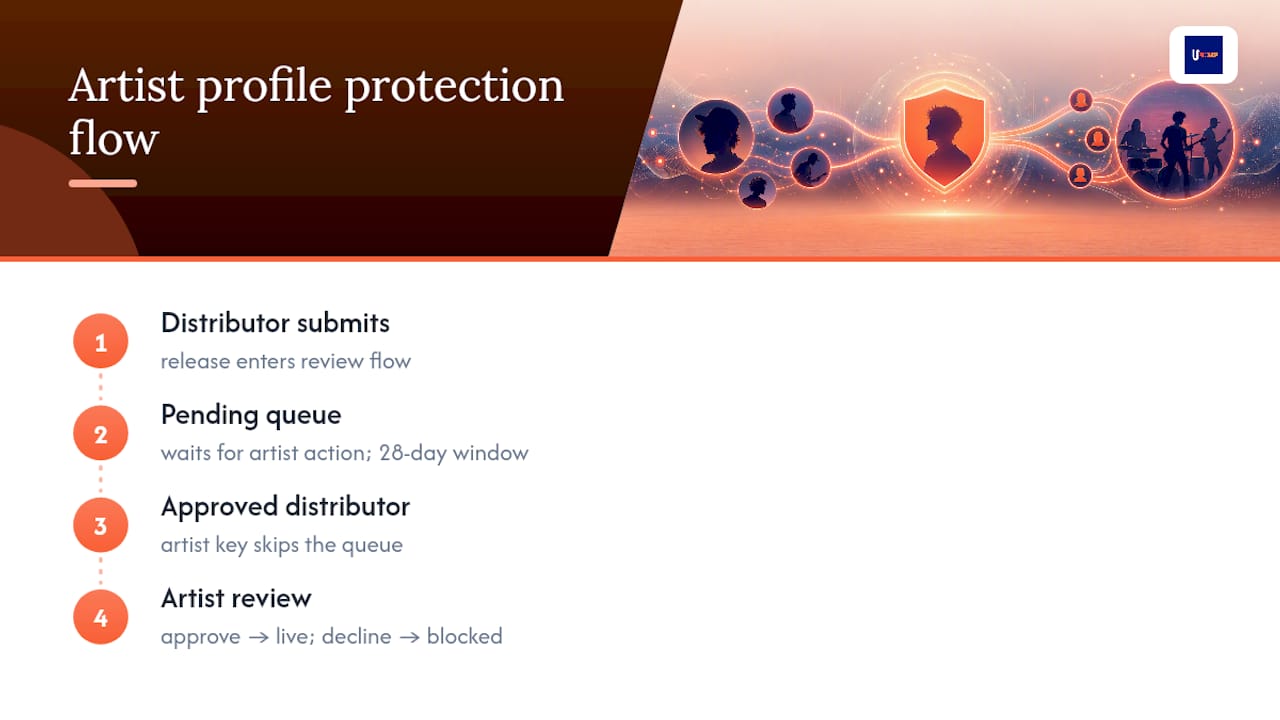
Spotify introduced Artist Profile Protection as a beta feature that gives you a review step before releases appear under your name. Instead of discovering a mismatch after the fact, you approve or decline eligible deliveries before they ever go live on your profile.
The workflow runs through a review queue: pending releases sit there until you act, and Spotify’s documentation on artist profile protection notes a 28 day window for pending items before they’re handled automatically. Approved distributors can also get an artist key, letting their deliveries skip the queue entirely once you’ve pre cleared them.
This feature earns its keep for artists with common names, frequent metadata slip-ups, or anyone managing a catalog across multiple distributors. The trade-off is an extra click on every release, and if you forget to check the queue, a legitimate release could sit waiting longer than you’d like; artists managing catalogs across distributors can find useful tips in Marketing for Musicians, Artists & Bands. For artists who’ve dealt with even one split profile, that small friction beats another mismatch.
Why Duplicate Profiles Happen in the First Place
Most split profiles trace back to inconsistent metadata, not some Spotify glitch. A few patterns show up constantly:
- Name variants and punctuation differences (an added period, a dropped “The,” a stylized character) create a second profile Spotify treats as a separate artist.
- Featuring credits or track-level name changes can spawn a new entity if artist roles weren’t set correctly at delivery.
- Switching distributors without carrying over your artist ID is one of the most common causes of a split, since the new delivery arrives with no link back to your existing profile.
The fix is prevention: keep your artist name formatted identically on every release, confirm your distributor supports artist ID delivery, and enable Artist Profile Protection once you’ve consolidated. Spotify’s own research on automated name disambiguation confirms that metadata and audio matching can flag likely duplicates, but the system isn’t built to fix them without human or distributor input.
What Happens After You File a Merge Request
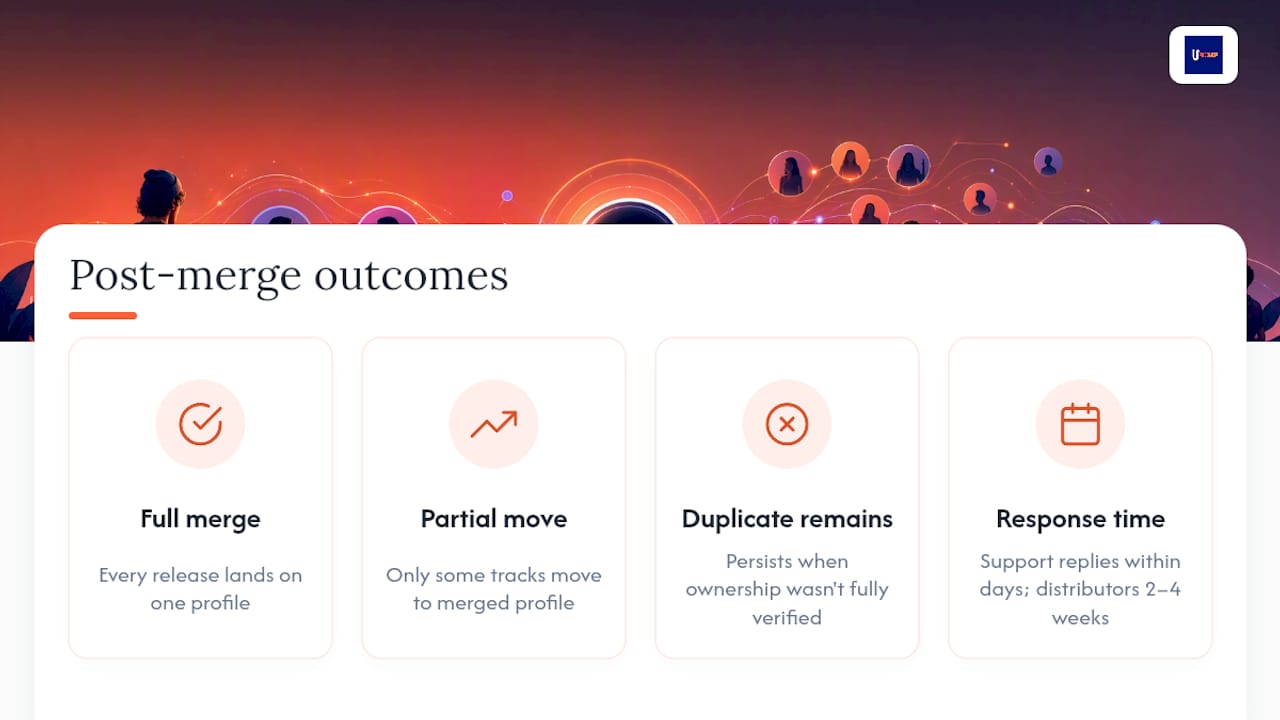
Spotify support typically replies within days once you submit the content mismatch form. Distributor-led fixes usually run longer, often 2 to 4 weeks depending on the provider and how many releases need updated artist IDs.
Three outcomes are common: a full merge where every release lands on one profile, a partial relocation where only some tracks move, or the duplicate profile persisting because ownership wasn’t fully verified. Check your retained profile’s follower count, release list, and playlist placements to confirm the fix actually stuck, and keep the confirmation email as a record if anything reverts later.
Why Proactive Catalog Hygiene Matters for Artist Growth
A split profile doesn’t just look messy. It quietly fractures your follower count, your playlist data, and the analytics you need to plan your next release. Claim your profiles, standardize your metadata, and coordinate with your distributor before you’re chasing a fix under deadline pressure. Clean catalog data is what makes streaming analytics and playlist pitching actually useful, instead of guesswork built on incomplete numbers.
— Karan
Let Your Distributor Handle Metadata So You Don’t Have To
A distribution service that includes consistent artist ID support can help prevent the metadata gaps that cause split profiles in the first place.

If you’ve ever dealt with a duplicate profile, you already know how much time it costs to untangle. UpNComer’s distribution route is built to avoid that mess from the start: every release goes out with the metadata structure Spotify needs to keep your catalog attached to one profile, monetized through a straightforward 6% royalty split with no subscription fee for distribution itself. Pair that with UpNComer Pro at $27 a month or $300 a year for the full toolkit, including Amplitude AI guidance, streaming analytics, and release planning, and you’re managing your whole catalog from one place instead of stitching together separate services. If you’re planning a migration or dealing with a split profile right now, check the distribution page to see how the setup works before you switch.
Sources
- Music mixed up with another artist - Spotify
- Introducing Artist Profile Protection: Giving Artists More Control Over What Shows Up Under Their Name – Spotify for Artists
- Which Witch? — artist name disambiguation and catalog curation using audio and metadata
FAQ
Is There a Way to Blend or Merge Two Artist Profiles on Spotify?
Yes, but it requires claiming both profiles and submitting a request through the content mismatch form or your distributor rather than a built-in merge tool. Spotify reviews the evidence and moves the releases to the profile you specify.
Can I Claim Two Artist Profiles on Spotify?
Yes, you can claim multiple profiles in Spotify for Artists as long as you can verify ownership of each one. Claiming both is required before Spotify will act on any merge or relocation request.
Can You Merge Two Existing Spotify Accounts?
You can consolidate two artist profiles’ releases onto one, but the underlying Spotify for Artists accounts themselves aren’t technically fused into a single login. The practical result artists want, unified streams and followers under one profile, comes from relocating releases rather than merging accounts.
How Many Streams on Spotify Does It Take to Earn $1,000,000?
Spotify doesn’t publish a fixed per-stream rate, and payouts vary by market, subscription type, and label agreements, so there’s no single stream count that guarantees a specific payout. This question falls outside what a profile merge affects. Unifying your profiles won’t change your rate, but it will make your actual stream totals accurate, which matters when you’re tracking revenue and planning releases.
What Is Artist Profile Protection and Do I Need It?
It’s a beta feature that lets you approve or decline releases before they show up on your profile, using a review queue and an artist key for pre-approved distributors. It’s worth enabling if you’ve had mix-ups before or share a name with another artist.