How to Release Videos on YouTube: Artist Checklist

Publish your Official Music Video as the anchor on release day, support it with staggered release videos and Shorts, and use a YouTube Premiere to turn your launch into a live event. That’s the whole plan. Everything below is the execution.
Quick-start checklist for the next 24–72 hours:
- Finalize and export your video file (H.264, 1080p minimum)
- Write your title, description, and tags before you upload
- Schedule your Premiere well in advance so subscribers see it in their feed
- Upload a short trailer to play on the Premiere watch page while fans wait
- Share the Premiere watch page link across every social channel
- Pin a comment the moment the video goes live
- Post a YouTube Short teaser within 24 hours of launch
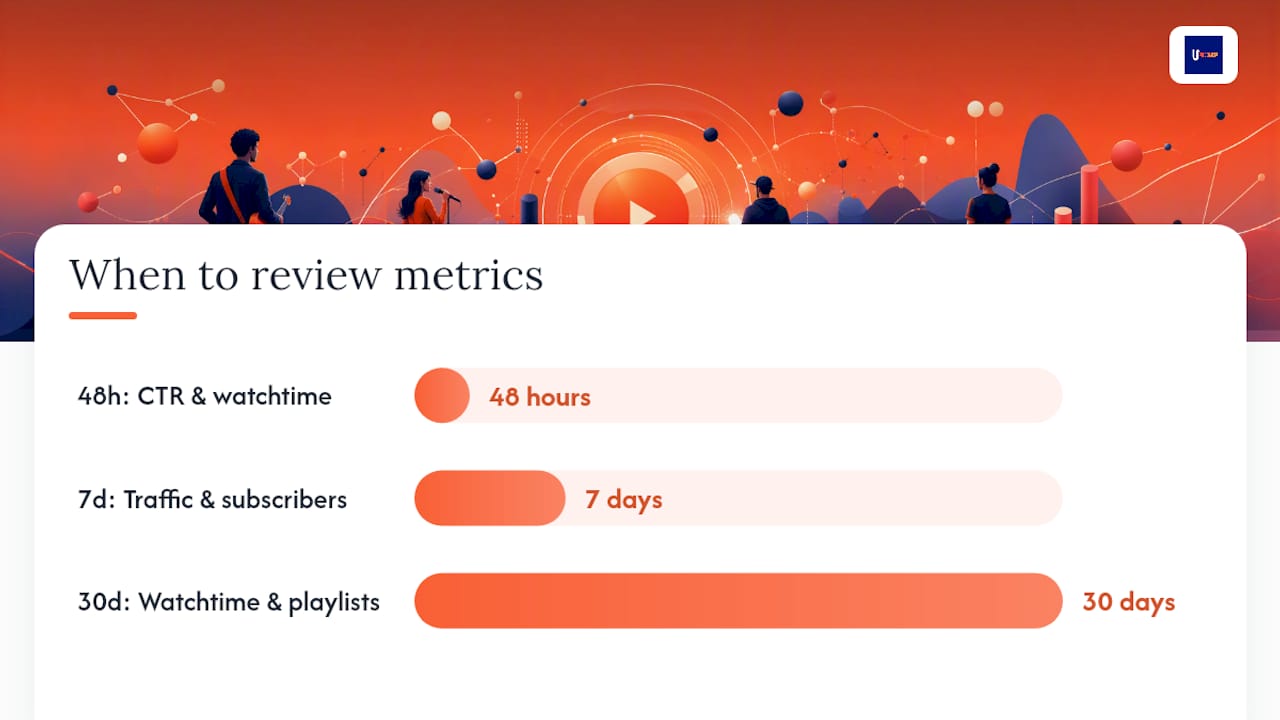
- Check YouTube Studio analytics at 48 hours and again at 7 days
Pro Tip: Upload a 30–60 second trailer specifically for the Premiere landing page. Game and film studios have used this technique for years, as seen in launch trailers like Ground Zero, and it works just as well for music video releases. Fans who land on the watch page before the Premiere starts stay engaged instead of bouncing.
Key Takeaways
Uploading your Official Music Video on the same day as your audio release, supported by a YouTube Premiere and staggered releases, gives independent artists the strongest start for early subscriber growth and sustained discovery.
| Point | Details |
|---|---|
| Same-day OMV release | YouTube for Artists links same-day video uploads to higher subscriber growth and more views in the first two weeks. |
| Premiere setup | Schedule at least 24 hours in advance, upload a trailer, and be present in chat to maximize engagement. |
| Multi-format staggering | Release lyric videos, Shorts, and visualizers after the OMV to create multiple discovery windows. |
| Metadata and CTR | A weak thumbnail is the top reason for low CTR; remake it within 48 hours if your rate falls below 2%. |
| Upncomer workflow | Upncomer’s Growth Engine, Data Analyst, and Distribution modules centralize the full release workflow for independent artists. |
Table of Contents
- What should you prepare 2–6 weeks before release day?
- What does a strong release-day checklist look like?
- How do you keep momentum going after the launch spike?
- How do you write titles, descriptions, and tags that get found?
- What are the technical specs you need to get right?
- Should you release your music video the same day as the audio?
- Which YouTube metrics actually matter after you release?
- The launch mistakes most artists don’t catch until it’s too late
- Upncomer runs your entire release workflow in one place
- Sources
- FAQ
What should you prepare 2–6 weeks before release day?
Getting your assets organized early is what separates a clean launch from a chaotic one. Most of the stress artists feel on release day comes from decisions that should have been made two weeks earlier.
Asset inventory
Before you schedule anything, confirm you have all of these ready:
| Asset | Format / Spec | Notes |
|---|---|---|
| Official Music Video (OMV) | MP4, H.264, 1080p or 4K | Master export, color-graded |
| Lyric video or visualizer | MP4, H.264, 1080p | Backup if OMV is delayed |
| Short-form teaser (15–60 sec) | MP4, vertical for Shorts | Cut from OMV or BTS footage |
| Thumbnail | JPG/PNG, under 2 MB | Three drafts minimum |
| Audio master | WAV or FLAC, 24-bit | Delivered to distributor |
| Artwork | JPG/PNG | For streaming platforms |
| SRT caption file | .srt | For accessibility and SEO |
| Credits and metadata | Text document | For description template |
Scheduling milestones
Work backward from your release date and hit these checkpoints:
Six weeks out: Deliver audio master and artwork to your music distributor. Streaming platforms need lead time, and your video release should land on the same day as the audio.
Two to three weeks out: Lock your thumbnail design, finalize your title and description, and draft your Premiere trailer. YouTube for Artists recommends uploading your Official Music Video on the same day as the audio release, so coordinate both deliveries now.
One week out: Schedule the Premiere in YouTube Studio. YouTube’s Premiere guidelines recommend scheduling at least 24 hours in advance so the thumbnail appears in subscribers’ feeds and viewers can set reminders.
48–72 hours out: Share the Premiere watch page link, post a teaser on Instagram Stories and TikTok, and brief anyone on your team about their launch-day role.
Pro Tip: Draft three thumbnail variations and test them with a small group before you commit. Your thumbnail is the first thing a new listener sees, and a weak one will kill your click-through rate before the algorithm ever has a chance to push your video. Check out the artist branding guide for thumbnail and channel art principles that hold up.
What does a strong release-day checklist look like?
Release day is not the time to improvise. The sequence below covers the Premiere window and the first 48 hours, step by step.
- Confirm your Premiere is scheduled correctly. Open YouTube Studio and verify the publish time, thumbnail, title, and description are all saved. Remember that YouTube displays publish dates in Pacific Standard Time, so if you’re in a different time zone, double-check that the displayed date matches your intended release date.
- Set your Premiere trailer live. The trailer plays on the watch page while fans wait. YouTube’s Premiere setup guide walks through uploading the trailer and setting the countdown. Do this at least a day before the Premiere, not the morning of.
- Go live in the Premiere chat 10–15 minutes early. Be present. Greet fans by name, answer questions, and build the room. This is the moment that turns a passive view into a real fan interaction.
- Pin a comment the instant the video premieres. Your pinned comment should include a streaming link, a playlist save CTA, and a thank-you. Write it in advance so you’re not typing under pressure.
- Share the watch page link immediately after the Premiere ends. Post to Instagram, TikTok, X (Twitter), and Discord within the first hour. The watch page stays live as a standard video after the Premiere, so every share still counts.
- Enable cards and end screens. Cards can point to related videos or a merch link mid-video. End screens should push your most recent upload or a playlist. Set these up before the Premiere, not after.
- Post a YouTube Short within 24 hours. A 30–60 second vertical cut from the video keeps the momentum going and reaches a different segment of your audience. YouTube’s multi-format release checklist confirms that Shorts and long-form videos reach distinct viewer groups and feed separate recommendation signals.
- Monitor and moderate comments for the first 48 hours. Reply to the first wave of comments, especially from superfans. Early engagement signals tell YouTube’s algorithm the video is worth recommending.
Pro Tip: Avoid releasing a second high-value video on the exact same day as your Official Music Video. YouTube for Artists is clear that uploading competing videos simultaneously can split your traffic and weaken both. Make the OMV the anchor, then stagger everything else.
How do you keep momentum going after the launch spike?
The first 48 hours are the peak, but the 30 days after are where long-term discovery actually happens. Here’s how to stay active without burning out.
Days 1–7:
- Push a new YouTube Short every 2–3 days (behind-the-scenes, lyric pull, reaction clip)
- Post a Community tab update thanking fans and linking the video
- Submit to independent playlist curators via your pitching workflow; the playlist pitching guide covers the right approach
- Reply to every comment you can in the first week
- Share the video link in your email list and Discord
Weeks 2–4:
- Release a lyric video or visualizer as a second content spike, especially if your OMV was your only video asset on launch day. YouTube for Artists notes that lyric videos and visualizers are strong alternatives when the OMV isn’t ready, and they work just as well as follow-up content
- Time a remix or acoustic version drop to a marketing moment (a playlist feature, a press mention, a sync opportunity)
- Pitch the track to music blogs and online press using your PR playbook
Cross-promotion sample schedule:
- Instagram: Reel on day 1, Story poll on day 3, feed post with lyrics on day 7
- TikTok: Hook clip on day 1, duet or stitch prompt on day 5, “making of” on day 10
- X (Twitter): Watch link on day 1, milestone post at 1K views, fan repost on day 14
- Discord: Pinned announcement on day 1, listening party invite on day 7
On paid promotion: a small targeted ad spend makes sense once you have at least 48 hours of organic data. Use that data to identify which audience segment is watching longest, then target that profile. Without that baseline, you’re spending blind.
How do you write titles, descriptions, and tags that get found?
Good metadata is what gets your video discovered by people who don’t already follow you. Here’s what works.
Title templates:
- Standard upload:
[Song Name] - [Artist Name] (Official Music Video) - Premiere:
[Song Name] - [Artist Name] | PREMIERE [Date] - Lyric video:
[Song Name] - [Artist Name] (Official Lyric Video) - Acoustic/live:
[Song Name] - [Artist Name] (Live Session)
Description template:
[Hook sentence — what the song is about or the emotion it captures]

🎵 Stream / Save: [link]
📀 Buy / Download: [link]
👕 Merch: [link]
📧 Mailing list: [link]

--- TIMESTAMPS ---
0:00 Intro
0:45 Verse 1
[continue]

--- CREDITS ---
Written by:
Produced by:
Directed by:
Label / Distribution:

--- CONNECT ---
Instagram:
TikTok:
Spotify:

#[Genre] #[ArtistName] #[SongName]
Tags strategy: Lead with your artist name and song title, then add genre tags, mood tags, and descriptive phrases a new listener might search. Branded tags (your name) protect your channel from search drift; descriptive tags (genre, mood, instrument) help new listeners find you. Chapters, set via timestamps in the description, improve average view duration by letting viewers navigate, and watch time is one of YouTube’s strongest ranking signals.
CTAs that actually work:
- “Save this to your playlist” (drives playlist adds, which feed streaming algorithms)
- “Subscribe and hit the bell” (only ask once, in the end screen or pinned comment)
- “Link in bio to stream” (for cross-platform traffic)
- “Comment your favorite line” (drives comment engagement without begging for likes)
What are the technical specs you need to get right?
A technically clean upload protects your video quality and makes your channel look professional. These are the non-negotiables.
| Spec | Recommended Setting | Notes |
|---|---|---|
| Container | MP4 | Most reliable for YouTube |
| Video codec | H.264 | Widely supported; H.265 also accepted |
| Resolution | 1080p minimum; 4K preferred | Higher res = better compression headroom |
| Frame rate | Match original (24 or 30 fps) | Do not convert unless necessary |
| Audio codec | AAC | Stereo; avoid heavy limiting |
| Audio loudness | Around -14 LUFS integrated | YouTube normalizes to -14 LUFS; peaking above this gets turned down |
| Caption file | .srt or .vtt | Upload manually; auto-captions are inaccurate |
| Thumbnail | JPG or PNG, max 2 MB | Use readable fonts at small sizes |
On captions: upload your own SRT file rather than relying on YouTube’s auto-generated captions. Auto-captions misread artist names, song titles, and slang constantly. Accurate captions also index your lyrics as searchable text, which helps discoverability. If you have listeners in Spanish-speaking markets or other large language communities, adding a translated subtitle track is worth the extra hour.
For accessibility in thumbnails, use high-contrast text and avoid small fonts that disappear on mobile screens. Your thumbnail will display at roughly 168×94 pixels in search results on a phone, so test it at that size before you commit.
YouTube’s published date displays in Pacific Standard Time. If you’re releasing at midnight in New York, that’s 9 PM the previous day in PST. Schedule accordingly or your release date will show as the wrong day.
Should you release your music video the same day as the audio?
Yes, when you can. YouTube for Artists’ release day strategy shows that uploading an Official Music Video on the same day as the audio release correlates with higher subscriber growth and more views in the first two weeks compared to staggered releases. The audio and video together create a stronger signal across both YouTube and streaming platforms simultaneously.
When the OMV isn’t ready, don’t wait. Release a lyric video or visualizer on launch day, then use the OMV as a second spike event tied to a marketing moment (a press feature, a sync placement, a milestone). That approach keeps your release window active longer.
Sample 6-week release calendar
| Week | Deliverable |
|---|---|
| Week 6 | Deliver audio master + artwork to distributor; lock video edit |
| Week 5 | Finalize thumbnail (3 drafts); write title, description, tags |
| Week 4 | Schedule Premiere; upload trailer to watch page; draft social posts |
| Week 3 | Share Premiere watch page link; post teaser on TikTok and Instagram |
| Week 2 | Send playlist pitches; brief press contacts; prep pinned comment |
| Week 1 | Final checks: captions, end screens, cards, merch shelf |
| Release day | Premiere goes live; push Shorts; share across all channels |
| Week +1 | Release lyric video or visualizer; reply to all comments |
| Week +2 | Remix or acoustic version; paid ad if organic data supports it |
| Week +3–4 | Press pitching follow-up; playlist follow-up; second Community post |
Pro Tip: Treat your Official Music Video as the anchor and everything else as satellites. A lyric video released two weeks after the OMV gets its own recommendation cycle, its own search entry point, and its own share moment. Staggering formats multiplies your discovery windows instead of splitting a single one.
Which YouTube metrics actually matter after you release?
Analytics without a plan is just noise. Here’s what to watch and what to do about it.
Core KPIs:
- Click-through rate (CTR): If your CTR is below 2%, your thumbnail or title isn’t compelling enough. Remake the thumbnail first; it has the bigger impact.
- Average view duration / watch time: Low watch time in the first 30 seconds means your intro is losing people. Trim it or recut the opening hook.
- Traffic sources: High traffic from YouTube Search means your metadata is working. High traffic from Suggested Videos means the algorithm is picking you up. Low traffic from both means you need more external promotion.
- Subscriber growth: A spike on release day that flatlines immediately suggests your content isn’t converting casual viewers. Add a stronger CTA in your end screen.
- Impressions: High impressions with low CTR means YouTube is showing your video but viewers aren’t clicking. The thumbnail is the problem.
- Engagement rate (likes, comments, shares): Comments carry more weight than likes in YouTube’s signals. Prompt a specific comment response in your video (“Drop your favorite lyric below”).
Review schedule:
- 48 hours: Check CTR and average view duration. If CTR is low, swap the thumbnail now while the video is still getting pushed.
- 7 days: Review traffic sources and subscriber growth. Identify which platform is sending the most external traffic and double down there.
- 30 days: Assess total watch time and playlist performance. Decide whether a second content push (remix, live version) makes sense based on the data.
Upncomer’s Growth Engine and Data Analyst modules map directly to these metrics, pulling streaming analytics and audience insights into one dashboard so you’re not switching between YouTube Studio, Spotify for Artists, and spreadsheets to get the full picture.
The launch mistakes most artists don’t catch until it’s too late
Most DIY release problems aren’t creative failures. They’re operational ones, and they’re almost always avoidable.
The biggest one: going into a Premiere without a moderation plan. You’ve scheduled the event, uploaded the trailer, and shared the watch page. Then the Premiere starts, the chat fills up, and you’re scrambling to respond while also watching the video for the first time with your fans. The result is a chaotic chat that feels unmanaged, and new viewers who land mid-Premiere leave without engaging.
Fix it by treating the Premiere chat like a show. Prepare three or four conversation prompts in advance (“What’s your favorite line so far?”, “Where are you watching from?”). Have a second person moderate if you can. And reply to the first 10–15 comments personally, by name, in the first 10 minutes. That level of presence is what turns a viewer into a fan.
The second common miss: skipping captions. Auto-captions are not good enough. They misread artist names, mangle song titles, and fail listeners who are watching without sound (which is a significant portion of mobile viewers). An accurate SRT file takes 30 minutes to create and pays off in both accessibility and searchability.
Both of these are fixable before your next release. The checklist in this guide covers them. Use it.
Upncomer runs your entire release workflow in one place
Managing a release across YouTube Studio, your distributor, social schedulers, ad platforms, and analytics dashboards is genuinely exhausting. Upncomer is built to replace that stack for independent artists.

The platform’s Distribution module handles audio and metadata delivery to streaming platforms. Content Creator helps you schedule and cross-post release videos, Shorts, and social content without switching apps. Growth Engine manages ad campaigns with templates built for music releases, so you’re not starting from scratch every time. Data Analyst pulls YouTube, streaming, and social metrics into a single dashboard, and Publicist automates playlist and press pitching so follow-ups don’t fall through the cracks.
Every module in the release workflow connects to the others, which means your release calendar, your analytics, and your promotion plan all live in the same place. No more copy-pasting links between tabs at midnight on release day.
Start your release plan with Upncomer and see how much of the operational work you can hand off before your next drop.
Sources
- YouTube for Artists - Resources - Release Day Strategy on YouTube
- Resources - Multi-Format Release Checklist
- YouTube premiere tips - YouTube Help
- Premiere a new video - YouTube Help
- Support
- Ground Zero - Official Launch Trailer - IGN
FAQ
What is a YouTube Premiere and how does it help artists?
A YouTube Premiere turns a pre-recorded video into a live event with a shared watch page, live chat, and reminder notifications. YouTube recommends scheduling Premieres at least 24 hours in advance so subscribers can set reminders and the thumbnail appears in their feed.
How do I release a video on YouTube with maximum visibility?
Upload your video as a scheduled Premiere, optimize your title and description with relevant keywords and timestamps, upload an accurate SRT caption file, and share the watch page link across all social channels before the Premiere goes live.
Should I release my music video the same day as the audio?
Yes. YouTube for Artists’ data shows that uploading an Official Music Video on the same day as the audio release correlates with higher subscriber growth and more views in the first two weeks. If the OMV isn’t ready, release a lyric video or visualizer instead.
What is a video press release for music?
A video press release is a short promotional clip, usually around 60 seconds, sent to blogs, playlist curators, and media contacts to announce an upcoming release. It typically includes a hook from the track, key release details, and a link to the Premiere watch page or streaming pre-save.
When does YouTube show the published date on a video?
YouTube displays the published date based on Pacific Standard Time, regardless of where you are. If you’re releasing at midnight EST, schedule for 9 PM PST the night before to keep the correct date showing on your watch page.