Reels Ideas for Musicians: 50+ Ready-to-Shoot Formats
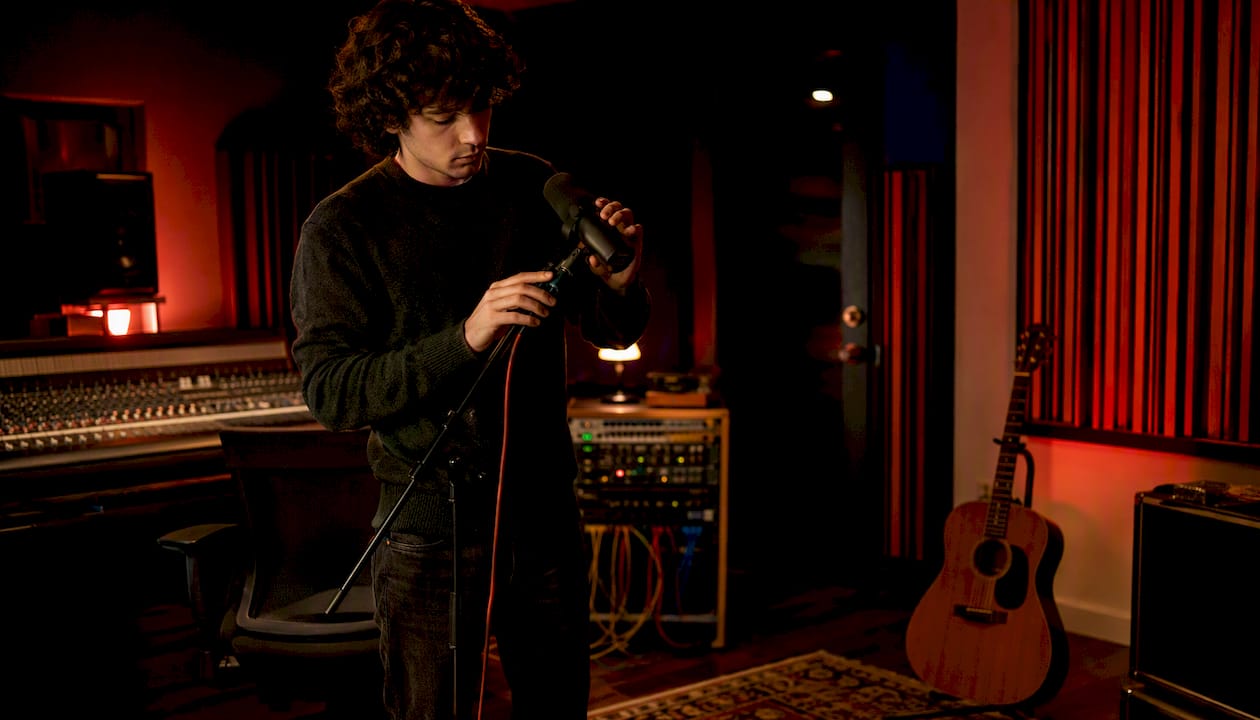
The highest-impact Reels for independent musicians fall into five categories: short hook performance clips, lyric reveal visuals, behind-the-scenes studio or practice moments, loop/vibe clips, and DM-shareable “bridge” content fans send to friends. Pick one from that list and shoot it today.
**Five ideas you can shoot in the next 90 minutes: **
- Hook performance clip: Film 15 seconds of your song’s most explosive moment, starting on beat one.
- Lyric reveal: Show one powerful lyric line in large text over a moody background, no talking required.
- Behind-the-scenes: Point your phone at your pedalboard, vocal chain, or notebook and explain one choice.
- Loop/vibe clip: Record a 10-second ambient loop of you playing something hypnotic, then loop it in editing.
- Bridge share-bait: Film a 20-second clip of your chorus that makes someone think “my friend needs to hear this.”
Keep every Reel between 15 and 30 seconds. Open with a visual or sonic punch in the first two seconds. End with one CTA only: follow, save, share, or link in bio. Never stack two CTAs in the same Reel.
Pro Tip: Lock your 15–30 second audio snippet before you film anything. Every visual decision flows from that clip, and you can batch six different Reel formats from a single recording session.
Key Takeaways
The most effective Reels strategy for independent musicians combines DM-shareable formats, raw phone-shot aesthetics, and caption-first keyword placement to drive discovery, saves, and streams simultaneously.
| Point | Details |
|---|---|
| Hook in the first 2 seconds | Open on your song’s strongest moment; viewers decide to stay or scroll within 1.5–3 seconds. |
| Shares outweigh likes | Shares are weighted significantly higher than likes; build at least one DM-shareable “bridge” clip per week. |
| Raw beats polished for discovery | Phone-shot visuals outperformed studio-produced content by about 35% in 2026 discovery testing. |
| Keywords beat hashtag clouds | Caption keyword optimization lifts discovery reach by roughly 35.6% compared to hashtag-only strategies; use 1–2 focused hashtags. |
| Upncomer for batching and analytics | Upncomer’s Content Creator, Amplitude AI, and Data Analyst modules help independent artists batch Reels, track DM-share velocity, and adjust campaigns in real time. |
Table of Contents
- What are the best Reels ideas for musicians right now?
- How do you structure a Reel so it actually gets watched?
- What audio strategy actually works for musicians on Reels?
- How do you turn existing content into Reels without re-shooting?
- What gear and apps do musicians need for pro-looking Reels on a budget?
- How do captions, keywords, and posting timing drive real growth?
- Ten plug-and-play Reel templates you can use this week
- What 2026 algorithm changes should every musician know about?
- The craft vs. content tension is real, and most advice gets it wrong
- Upncomer helps you batch, schedule, and measure your Reels without the guesswork
- Sources
- FAQ
What are the best Reels ideas for musicians right now?
The most useful way to think about short-form content is by goal, not by format. A Reel that drives discovery needs a different structure than one that sells tickets. Here is a categorized bank of 50+ ideas organized by what you actually want to happen.
Discover: reach new fans
These formats prioritize shares and algorithmic reach over depth. Keep them under 20 seconds.
- Open on your song’s best hook, no intro, no talking
- Film a “what genre is this?” moment that makes people argue in comments
- Record a one-take performance in an unusual location (parking garage, stairwell, rooftop)
- Post a “you’ve never heard this chord progression” theory clip
- Show your face reacting to hearing your own mix for the first time
- Film a 10-second ambient loop of a riff that sounds like a specific mood or season
- Do a “this song was written in 20 minutes” reveal with the original voice memo
- Post a “before the studio” vs “after mastering” audio comparison
- Film a stranger’s reaction to hearing your music for the first time
- Record a “what my music sounds like vs what I told my parents it sounds like” meme format
- Post a 15-second clip of your most unexpected song transition
- Film a “day in the life of an indie artist” montage, 3 seconds per scene
Caption template: “This is what [genre/mood] sounds like when you [unique process]. Follow for more.”
Shot length: 8–20 seconds. Why it works: novelty and specificity drive shares into DMs, which the 2026 algorithm weights heavily.
Convert: earn streams and follows
These formats give people a reason to act. They work best at 20–30 seconds.
- Play the song’s hook, then show the Spotify/Apple Music link in bio
- Film a “this song drops Friday” countdown with a 10-second preview
- Post a “here’s the story behind this track” spoken-word clip under 30 seconds
- Show your streaming numbers growing in real time during a release week
- Film a “how I wrote the bridge in one sitting” breakdown
- Post a “this is the song I’m most proud of and here’s why” direct-to-camera clip
- Record a “listen to this on headphones” ASMR-style performance
- Film a “the verse nobody talks about” deep cut reveal
- Post a side-by-side of your demo vs the final master
- Show the lyric sheet with annotations explaining hidden meanings
Caption template: “New track out now. The story behind it is [one sentence]. Link in bio.”
Shot length: 15–30 seconds. Why it works: specificity and story create emotional investment before the listener even opens a streaming app.
Deepen fandom: turn casual listeners into superfans
These formats reward people who already know you. Saves are the primary signal here.
- Film a “gear rundown” showing every piece of equipment in your signal chain
- Post a “how I tune my guitar/keys/drums for this specific sound” tutorial
- Show your songwriting notebook with real lyrics and scratch-outs
- Film a “the chord I always come back to” theory moment
- Post a “here’s the sample I flipped” production breakdown
- Record a “this is what the song was about before I rewrote the bridge” story
- Film a “how I record vocals at home” setup tour
- Post a “my top 5 influences for this album” visual list
- Show a “then vs now” comparison of your playing or production from two years ago
- Film a “what I wish I knew before recording my first EP” advice clip
Caption template: “Save this if you’re trying to [skill/goal]. Here’s exactly how I do it.”
Shot length: 20–45 seconds. Why it works: tutorial and gear content earns saves, which signal long-term audience value to the platform.
Direct monetization: sell tickets and merch
These formats need a clear CTA and a tight visual hook. Keep them punchy.
- Film a “last 10 tickets” urgency clip with your show date on screen
- Post a “merch drop in 24 hours” teaser showing the item without the full design
- Record a “this is what the show feels like” crowd energy clip from a past performance
- Film a “I made this hoodie for fans who [specific identity]” story-driven merch reveal
- Post a “meet me at [venue name]” location-tagged clip
- Show the merch being packed and shipped to real fans
- Film a “VIP upgrade available” clip showing what the experience looks like
- Post a “this is the setlist for [city]” reveal with a ticket link in bio
Caption template: “Tickets/merch link in bio. [City] — [date]. Don’t sleep on it.”
Shot length: 10–20 seconds. Why it works: urgency and specificity (real dates, real venues) convert better than generic “buy now” posts.
Collaborator and duet content
These formats extend your reach into other artists’ audiences.
- Post a “finish this line” prompt with your melody and an empty second half
- Film a “I wrote this riff, you add the chords” challenge
- Post a “duet this with your instrument” loop clip
- Record a “what genre would you put this in?” open-ended clip
- Film a “collab coming soon” teaser with another artist’s silhouette
- Post a “I sampled [genre] and this happened” mashup reveal
Caption template: “Duet this or tag someone who needs to hear it.”
Shot length: 8–15 seconds. Why it works: duet and remix prompts multiply your content’s reach without any extra production cost.
| Idea category | Primary goal | Best for |
|---|---|---|
| Hook performance clip | Discovery, new fans | All artists |
| Lyric reveal visual | Discovery, streams | Singer-songwriters, lyricists |
| Behind-the-scenes studio | Deepen fandom, saves | Producers, multi-instrumentalists |
| Loop/vibe clip | Discovery, shares | Instrumentalists, ambient artists |
| Tutorial/gear breakdown | Saves, superfans | Producers, educators |
| Merch/ticket tease | Direct monetization | Touring artists |
| Duet/finish-this-line prompt | Reach, collaborations | All artists |
| Meme/cultural hook | Discovery, shares | Pop, hip-hop, genre-fluid artists |
How do you structure a Reel so it actually gets watched?
Every Reel must earn the first 1.5–3 seconds or the rest does not matter. Practitioner guidance is consistent on this: open on the strongest musical or visual moment you have, not on a title card, not on “hey guys,” and not on silence.
The four-part structure that works:
- Visual or sonic pattern interrupt (0–2 seconds): Something unexpected that stops the scroll. A sudden loud chord, a close-up of hands on strings, a bold text overlay, or a jump cut.
- Context or story (2–10 seconds): One sentence of setup. What is this song? What is happening? Why should the viewer care?
- Payoff or sonic moment (10–25 seconds): The best part of the performance, the reveal, the drop, the emotional peak. This is what gets shared.
- Single CTA (final 2–3 seconds): One ask. Not three. One.
Six hook examples for musicians
- Lyric punch: Open mid-lyric on the most quotable line, text on screen, no intro.
- Surprising visual: Start on an extreme close-up of your instrument, then pull back to reveal the full setup.
- POV caption: “POV: you’re the only person in the room and I’m playing this for you.”
- Sudden movement: Jump cut from silence to full-band energy at beat one.
- Visible text pattern interrupt: Large, bold text on a dark background: “This chord progression is illegal.”
- Immediate sonic drop: No visual intro at all. The song starts at frame one, full volume.
How to build a Reel in 5 steps:
- Lock your 15–30 second audio clip and identify the single best moment within it.
- Decide your hook format from the six options above and film it first.
- Film the payoff moment (the chorus, the drop, the emotional peak) as your main clip.
- Add one text overlay in the first two seconds and one at the CTA moment.
- Export vertical (9:16), review the first frame, and confirm the hook lands before you post.
Four CTA templates to rotate:
- Follow: “Follow for more [genre] from an indie artist who [specific trait].”
- Save: “Save this if you want to [learn this technique / hear this song again].”
- Share: “Send this to someone who needs [this feeling / this song] today.”
- Link in bio: “Full track in bio. It drops [day].”
What audio strategy actually works for musicians on Reels?
Short answer: use original audio as your default and trending sounds as a tactical tool, not the other way around. Original audio builds your audio identity on the platform. Every time someone uses your sound, your name appears on their Reel. That compounds over time in a way that borrowing someone else’s trending audio never can.
Building that audio identity is one of the most underused advantages independent artists have over non-musicians on these platforms. A comedian or lifestyle creator cannot do what you do: drop original audio that fans can remix, duet, and share.
Original audio vs trending sounds vs mashups
Original audio pros: Builds audio identity, earns remix/duet plays, links back to your profile, supports streaming funnel. Original audio cons: Slower initial reach if you have a small audience; no built-in trend momentum.
Trending sounds pros: Immediate algorithmic boost from existing search volume; reaches non-followers faster. Trending sounds cons: Your content competes with thousands of other posts using the same audio; no brand equity built.
Mashup/remix pros: Combines your original with a trending element; can satisfy both discovery and identity goals. Mashup/remix cons: Licensing risk if the trending audio is commercially restricted; harder to execute cleanly on mobile.
Checklist to make your original audio discoverable:
- Upload the track to your distributor before posting the Reel so the audio is linked to your catalog
- Enable “Allow others to use this audio” in your Reel settings when the platform permits it
- Name your audio clip with your artist name and song title, not a generic label
- Include the song title and genre keywords in the caption’s first two lines
- Post a “use my audio” prompt in the caption to encourage duets
Pro Tip: Prepare a 15-second stem export of your track, just the hook with a clean fade-in and fade-out, no full mix. This is your Reels master. It is easier to sync visuals to, easier for fans to duet, and cleaner for the algorithm to classify.
Quick export checklist for Reels-ready snippets:
- Format: WAV or high-quality MP3, 44.1kHz
- Length: 15–30 seconds, with a 0.5-second fade-in and 1-second fade-out
- Content: the song’s strongest hook, not the intro
- Metadata: artist name, song title, and genre tag embedded
- Orientation: export a separate vocal-only stem for duet-friendly use
How do you turn existing content into Reels without re-shooting?
You probably already have more Reel material than you realize. A single live show, a 45-minute livestream, or a photo shoot session can generate 6–12 usable clips with the right workflow. Batching from existing footage is one of the fastest ways to build a content calendar without burning out.
Step-by-step repurposing workflow:
- Identify high-value moments: Watch your footage at 2x speed and drop a timestamp every time something visually or sonically interesting happens (a crowd reaction, a tight close-up, a funny moment, a peak musical moment).
- Extract 8–30 second clips: Use a mobile editing app to trim each timestamped moment into its own clip. Aim for 6–12 clips per source video.
- Add text overlay and caption keywords: Every clip needs at least one text element in the first two seconds. Add the song title, a lyric fragment, or a location tag.
- Create three variations per clip: Change the text overlay, the caption, and the opening frame. Three variations from one clip means three posts without three shoots.
- Queue your posts: Schedule 2–4 Reels per week from this batch. Space them out so you are not flooding your feed.
UGC and fan clips
Fan-shot content is some of the most credible material you can post, and it costs you nothing to produce. To use it properly: DM the fan directly, ask for explicit permission in writing, and credit their handle in your caption. That credit encourages other fans to film and share at future shows, which compounds your UGC library over time.
Quick tools for trimming, looping, and adding text (all US-available):
- CapCut: Free, fast trimming, auto-captions, and text animation. Best all-around mobile editor for Reels.
- InShot: Clean interface for trimming and looping clips; good for musicians who want minimal learning curve.
- Adobe Premiere Rush: More control over color and audio than CapCut; useful if you want consistent visual branding across posts.
- Splice: Built for musicians; handles multi-track audio layering and sync better than general-purpose editors.
- Canva (mobile): Best for lyric reveal and text-heavy Reels; templates speed up production significantly.
Suggested batching schedule: After a live show or livestream, export 8–12 raw clips the same night while the energy is fresh. Edit them into 3–4 finished Reels over the next two days. Post one immediately, schedule the rest across the following week. That single show can fuel your content calendar for 7–10 days.
What gear and apps do musicians need for pro-looking Reels on a budget?
You do not need a camera crew. The gear that moves the needle costs under $100 total, and raw phone-shot visuals actually outperform studio-produced content in discovery feeds by about 35%, according to 2026 analysis. Leaning into the phone-shot aesthetic is not a compromise. It is a strategy.
Budget gear that improves watch time:
- Phone tripod with flexible legs (Joby GorillaPod or similar, ~$30): Eliminates shaky footage without killing the handheld feel. Lets you film hands-free for performance clips.
- Clip-on lavalier mic (~$20–$40): The single biggest quality upgrade for talking-head or tutorial Reels. Bad audio kills retention faster than bad lighting.
- Small LED panel light (~$25): One light source pointed at your face or instrument removes the muddy shadows that make phone footage look cheap.
- Diffuser or white sheet: Softens harsh LED light. Free if you already own one.
Production checklist to run before every shoot:
- Phone orientation: vertical (9:16), locked
- Audio source: external mic for voice, direct line for instrument if possible
- First frame: does it contain a visual hook? If not, reframe.
- On-screen text: readable at phone size, high contrast, appears in the first 2 seconds
- Location tag: added in post, not burned into the video
| Mobile app | Primary task | Why musicians should use it |
|---|---|---|
| CapCut | Trim, loop, auto-caption | Fast workflow, free, strong text animation |
| InShot | Trim, loop, basic color | Clean interface, minimal learning curve |
| Adobe Premiere Rush | Color grade, audio mix | Consistent branding, more editing control |
| Splice | Multi-track audio sync | Built for musicians, handles stems well |
| Canva (mobile) | Text overlay, lyric reveals | Template library speeds up lyric content |
How do captions, keywords, and posting timing drive real growth?
Prioritize keywords over hashtags. Caption-first keywords, a specific location tag, and a CTA that triggers shares or saves will do more for your discovery than a cloud of 30 hashtags. A 2026 analysis found that keyword optimization in captions gives roughly a 35.6% lift in discovery reach compared to hashtag-only strategies, with the recommendation to use just 1–2 focused hashtags.
Put your most important keyword in the first two lines of your caption, because that is what the platform reads for classification and what viewers see before tapping “more.” Think of it like a search query: “indie folk singer-songwriter, new track out Friday” tells the algorithm exactly who to show your content to.
Three caption templates:
- Discovery: “[Genre/mood] music for people who [specific feeling or identity]. New track out now. Link in bio.”
- Save-bait: “Save this if you want to learn [specific technique]. Here’s exactly how I do it in 30 seconds.”
- Share-bait: “Send this to someone who needs to hear [this feeling / this song] right now.”
Keep captions under 150 characters for the visible preview. The full caption can be longer, but the first two lines carry all the weight.
Posting cadence and timing:
A sustainable weekly plan that avoids burnout looks like this: one performance clip, one behind-the-scenes post, and one personality or tutorial post per week. That is three posts, not seven. Consistency over volume.
For timing, Monday posts tend to capture early-week engagement when audiences are back online after the weekend. Tuesday through Thursday evenings (6–9 PM in your audience’s primary time zone) are historically strong for music content. Avoid posting on Friday afternoons when competition for attention peaks.
Respond to every comment in the first hour after posting. Early engagement signals to the algorithm that your content is worth distributing further. Even a short reply counts.
Mini checklist for measuring growth:
- Watch time and completion rate: are people finishing the Reel?
- Shares and DM velocity: how fast is this getting sent to friends?
- Saves: are people bookmarking this for later?
- Profile visits from Reels: are viewers clicking through to your page?
Pair this data with the analytics-first approach to understand which formats are actually moving your numbers.
Ten plug-and-play Reel templates you can use this week
These templates are designed for batching. One recording session can produce three variations of each by changing the opening frame, text overlay, and caption. Locking a 15–30 second snippet first and then building visuals around it is the fastest path from raw footage to a finished post.
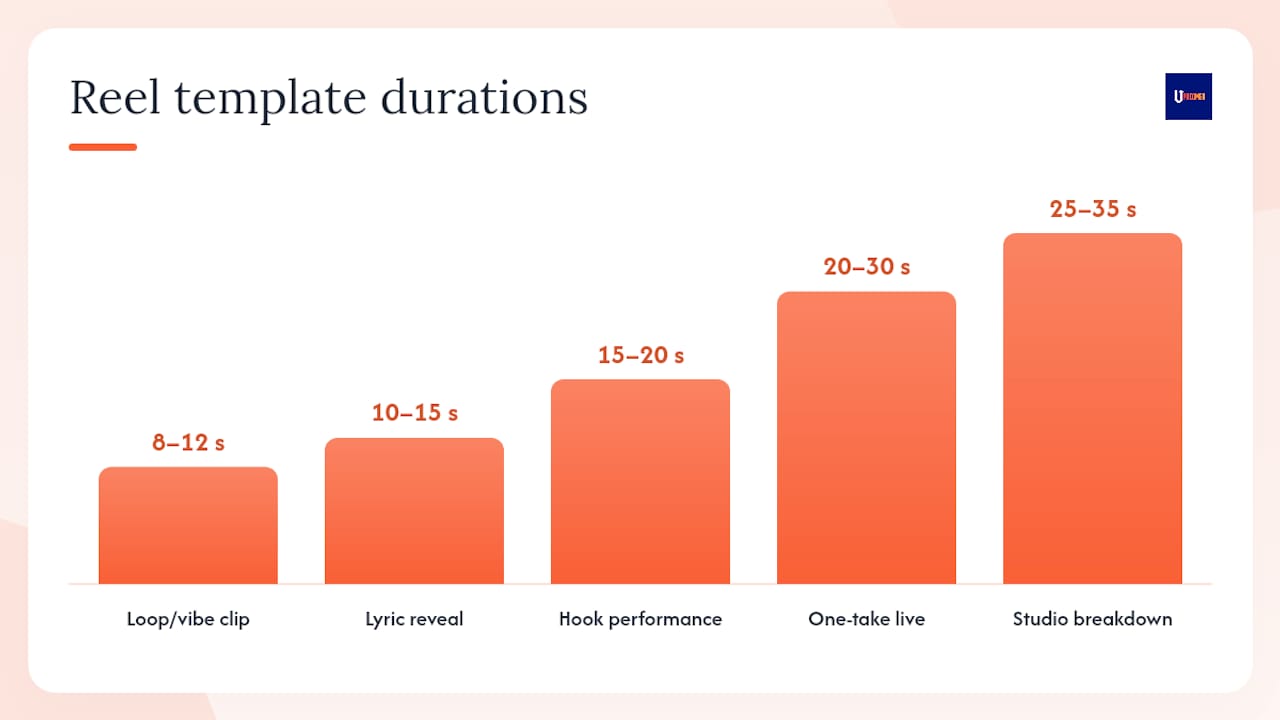
1. Hook performance clip (15–20 seconds)
- Shot 1: Extreme close-up of hands/instrument at beat one
- Shot 2: Pull back to reveal full setup
- Shot 3: Hold on the most emotional moment of the hook
- Shot 4: Cut to black or freeze frame
- Script: “This is [song name]. The hook hits at second three.”
- Caption: “[Genre] music. New track in bio.”
2. Lyric reveal (10–15 seconds)
- Shot 1: Black screen, large white text of the first lyric line
- Shot 2: Second lyric line fades in
- Shot 3: Artist face or instrument appears behind the text
- Shot 4: Song title and release date on screen
- Script: No voiceover needed. Let the lyrics speak.
- Caption: “The line that started this whole song.”
3. Loop/vibe clip (8–12 seconds)
- Shot 1: Close-up of instrument playing a hypnotic riff
- Shot 2: Same clip, looped seamlessly
- Shot 3: Subtle text: “[mood] music for [time of day or activity]”
- Script: None. The loop is the content.
- Caption: “Put this on repeat. You’re welcome.”
4. One-take live (20–30 seconds)
- Shot 1: Wide shot of full performance setup
- Shot 2: Close-up of face during the most emotional moment
- Shot 3: Reaction or natural ending
- Script: “One take. No edits. This is [song name].”
- Caption: “Raw and unfiltered. Full track in bio.”
5. Studio breakdown (25–35 seconds)
- Shot 1: Screen recording of DAW with the track playing
- Shot 2: Close-up of the specific element being explained
- Shot 3: Before/after audio comparison
- Script: “Here’s the one thing that made this track click.”
- Caption: “Save this if you produce music.”
6. Three versions of the same part (20–30 seconds)
- Shot 1: Version 1 of the riff/lyric/chord
- Shot 2: Version 2, slightly different
- Shot 3: Version 3, the final choice
- Script: “Which version would you have picked?”
- Caption: “The one I almost didn’t use.”
7. Duet/finish-this-line prompt (10–15 seconds)
- Shot 1: You singing or playing the first half of a phrase
- Shot 2: Silence or a visual pause where the second half would go
- Script: “Finish this line. Duet this.”
- Caption: “Tag someone who can finish it.”
8. Merch reveal (15–20 seconds)
- Shot 1: Merch item partially visible, teasing the design
- Shot 2: Full reveal with your face reacting
- Shot 3: Text overlay: “Available [date]. Link in bio.”
- Script: “I made this for the fans who [specific identity].”
- Caption: “Drops [date]. Link in bio.”
9. Ticket tease (10–15 seconds)
- Shot 1: Crowd energy from a past show
- Shot 2: Text overlay: “[City] — [Date]”
- Shot 3: “Last [X] tickets” urgency text
- Script: “If you’ve been waiting, this is your sign.”
- Caption: “Tickets in bio. [City], [Date].”
10. Fan reaction montage (20–30 seconds)
- Shot 1: Fan video clip 1 (with permission, credited)
- Shot 2: Fan video clip 2
- Shot 3: Your face reacting to watching them
- Script: “This is why I make music.”
- Caption: “Tag yourself if you were there.”
Batching note: Film shots 1 and 2 of each template in one session. Vary the text overlay and caption for three different posts. You get 30 posts from 10 templates without re-shooting a single frame.
What 2026 algorithm changes should every musician know about?
The platform’s ranking logic shifted meaningfully in 2026, and the changes favor independent artists who lean into authenticity over production value.
Share-to-DM velocity is now the most powerful distribution signal. The 2026 analysis found that shares are weighted roughly 4x higher than likes, with the platform specifically tracking how quickly content gets sent into private DMs. A Reel that 50 people share to friends in the first hour outperforms one that gets 500 likes with no shares.
The platform’s AI appears to reward authenticity signals: grain, handheld movement, natural light, and imperfect audio all read as genuine rather than commercial. This does not mean you should post blurry, inaudible content. It means a well-lit phone video with a clip mic will likely reach more new listeners than a polished music video clip.
The practical implication: write your caption like a search query, put your genre and mood keywords in the first two lines, and cut your hashtag count to 1–2 focused tags.
Actionable checklist for this week:
- Build one “bridge” clip per week: a 15–20 second Reel specifically designed to make someone think “I need to send this to [person].”
- Swap one over-produced Reel for a raw phone-shot version this month and compare the reach.
- Rewrite your next three captions as search queries: genre + mood + release info in the first two lines.
- Check your Reels insights for DM shares and saves, not just likes and views.
- Enable “Trial Reels” if your platform account has access, and use it to test new formats before committing to your main feed.
Reading your analytics: Open your Reels insights and look for three numbers: completion rate (are people finishing?), saves (are people bookmarking?), and shares (are people sending this to friends?). DM-share velocity, the speed at which shares happen in the first hour, is the clearest signal that a format is working. If a Reel gets strong DM shares but low likes, keep making that format. The algorithm sees what you see in the data, and it rewards it. Pair your platform insights with a dedicated music marketing analytics workflow to track these signals across your full release strategy.
The craft vs. content tension is real, and most advice gets it wrong
The standard advice is to post more. More formats, more trends, more frequency. That advice will burn you out before it builds you an audience.
What actually works for independent artists is narrower than most content guides admit: pick two formats you can execute well and post them consistently for six weeks before you change anything. Not ten formats. Two. A hook performance clip and a behind-the-scenes post, for example. That combination covers discovery and depth, it is sustainable, and it gives you enough data to know what is actually resonating with your specific audience.
The artists who grow on short-form platforms are not the ones who chase every trend. They are the ones who show up with something recognizable, week after week, until the algorithm and the audience both know what to expect from them. A sustainable weekly plan of one performance clip, one BTS post, and one personality post is genuinely enough to build consistent growth without sacrificing the time you need to actually make music.
Tools like Upncomer’s Content Creator and Amplitude AI exist precisely to reduce the overhead of this process, so you spend less time scheduling and analyzing and more time recording. The 12-week artist rollout framework is a good place to see how Reels fit into a full release campaign rather than existing as isolated posts.
Pick two formats. Run them for six weeks. Then look at your data and adjust.
Upncomer helps you batch, schedule, and measure your Reels without the guesswork
Managing a Reels strategy alongside recording, touring, and everything else that comes with being an independent artist is genuinely hard. Upncomer’s platform brings the tools that make it manageable into one place.
The Content Creator module helps you batch Reels content and schedule posts across platforms without switching between five different apps. Amplitude AI surfaces insights about which formats are driving shares, saves, and profile visits, so you know where to double down before you waste another week on a format that is not working. The Distribution module ensures your original audio is properly linked to your catalog the moment a Reel goes live, so every play and duet feeds back to your streaming numbers. The Data Analyst dashboard tracks DM-share velocity, completion rates, and saves in one view, giving you the kind of analytics clarity that used to require a full marketing team.

For a release week, that looks like this in practice: batch six Reels from one recording session using Content Creator, schedule them across the week with Amplitude AI’s timing recommendations, and watch the Data Analyst dashboard to see which caption keyword is driving the most profile visits. Adjust the remaining posts before they go live. That is a three-post release campaign that runs on data, not guesswork.
Ready to run your next release like that? Start with Upncomer and see how the full platform fits your workflow.
Sources
These are the primary sources used in this article, along with Upncomer resources for artists who want to go deeper on release planning and content strategy.
- Cracking The Instagram Algorithm: A 2026 Guide for Musicians
- How to Make Instagram Reels to Promote Your Music | Soundlink
- Here’s How to Use Instagram Reels to Actually Get Your Music Heard - That Eric Alper
- Content Ideas for Musicians That Don’t Feel Cringe (Reels, Shorts, TikToks) - Education Arsenal
FAQ
What are the best Reels ideas for musicians just starting out?
Start with a hook performance clip and a behind-the-scenes post. These two formats cover discovery and depth, require no crew, and give you enough data within two weeks to know what your audience responds to.
How long should a musician’s Reel be?
The 15–30 second range works best for most formats. Loop and vibe clips can be as short as 8–12 seconds, while studio breakdowns and tutorials can stretch to 45 seconds without losing retention.
Should musicians use original audio or trending sounds on Reels?
How do you get more shares and saves on a musician’s Reel?
Build content specifically designed to be sent to a friend: a lyric that hits hard, a surprising musical moment, or a tutorial fans want to save. Shares are weighted significantly higher than likes in 2026, so DM-shareable content drives far more discovery than content optimized for views alone.
How often should an independent musician post Reels?
Three posts per week is a sustainable and effective cadence: one performance clip, one behind-the-scenes post, and one personality or tutorial post. Consistency over six weeks matters more than posting volume in any single week.